
Chapter 3
3

Graphical Representation of Data
You must have seen graphs, diagrams and maps showing different types of data. For example, the thematic maps shown in Chapter 1 of book for Class XI entitled Practical Work in Geography, Part-I (NCERT, 2006) depict relief and slope, climatic conditions, distribution of rocks and minerals, soils, population, industries, general land use and cropping pattern in the Nagpur district, Maharashtra. These maps have been drawn using large volume of related data collected, compiled and processed. Have you ever thought what would have happened if the same information would have been either in tabular form or in a descriptive transcript? Perhaps, it would not have been possible from such a medium of communication to draw visual impressions which we get through these maps. Besides, it would also have been a time consuming task to draw inferences about whatever is being presented in non-graphical form. Hence, the graphs, diagrams and maps enhance our capabilities to make meaningful comparisons between the phenomena represented, save our time and present a simplified view of the characteristics represented. In the present chapter, we will discuss methods of constructing different types of graphs, diagrams and maps.
Representation of Data
The data describe the properties of the phenomena they represent. They are collected from a variety of sources (Chapter 1). The geographers, economists, resource scientists and the decision makers use a lot of data these days. Besides the tabular form, the data may also be presented in some graphic or diagrammatic form. The transformation of data through visual methods like graphs, diagrams, maps and charts is called representation of data. Such a form of the presentation of data makes it easy to understand the patterns of population growth, distribution and the density, sex ratio, age-sex composition, occupational structure, etc. within a geographical territory. There is a Chinese proverb that ‘a picture is equivalent to thousands of words’. Hence, the graphic method of the representation of data enhances our understanding, and makes the comparisons easy. Besides, such methods create an imprint on mind for a longer time.
General Rules for Drawing Graphs, Diagrams and Maps
1. Selection of a Suitable Method
Data represent various themes such as temperature, rainfall, growth and distribution of the population, production, distribution and trade of different commodities, etc. These characteristics of the data need to be suitably represented by an appropriate graphical method. For example, data related to the temperature or growth of population between different periods in time and for different countries/states may best be represented using line graphs. Similarly, bar diagrams are suited best for showing rainfall or the production of commodities. The population distribution, both human and livestock, or the distribution of the crop producing areas may suitably be represented on dot maps and the population density using choropleth maps.
2. Selection of Suitable Scale
The scale is used as measure of the data for representation over diagrams and maps. Hence, the selection of suitable scale for the given data sets should be carefully made and must take into consideration entire data that is to be represented. The scale should neither be too large nor too small.
3. Design
We know that the design is an important cartographic task (Refer ‘Essentials of Map Making’ as discussed in Chapter 1 of the Practical Work in Geography, Part-I (NCERT, 2006), a textbook of Class XI). The following components of the cartographic designs are important. Hence, these should be carefully shown on the final diagram/map.
Title
The title of the diagram/map indicates the name of the area, reference year of the data used and the caption of the diagram. These components are represented using letters and numbers of different font sizes and thickness. Besides, their placing also matters. Normally, title, subtitle and the corresponding year are shown in the centre at the top of the map/diagram.
Legend
A legend or index is an important component of any diagram/map. It explains the colours, shades, symbols and signs used in the map and diagram. It should also be carefully drawn and must correspond to the contents of the map/diagram. Besides, it also needs to be properly positioned. Normally, a legend is shown either at the lower left or lower right side of the map sheet.
Direction
The maps, being a representation of the part of the earth's surface, need be oriented to the directions. Hence, the direction symbol, i. e. North, should also be drawn and properly placed on the final map.
Construction of Diagrams
The data possess measurable characteristics such as length, width and volume. The diagrams and the maps that are drawn to represent these data related characteristics may be grouped into the following types:
- Line graphs
- Bar diagrams
- Pie diagram
• Wind rose and star diagram
- Flow Charts
Line Graph
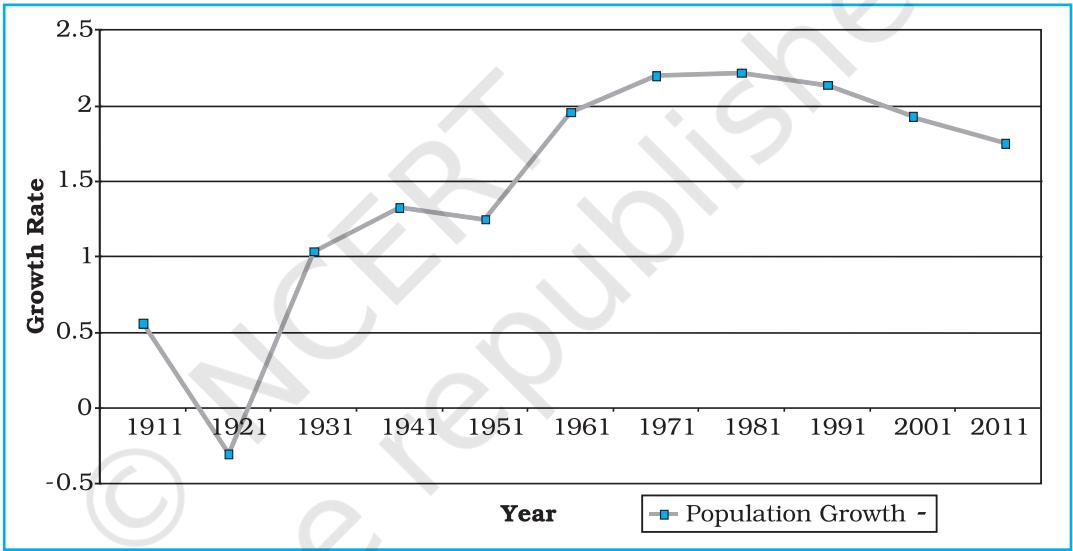
The line graphs are usually drawn to represent the time series data related to the temperature, rainfall, population growth, birth rates and the death rates. Table 3.1 provides the data used for the construction of Fig 3.2.
Construction of a Line Graph
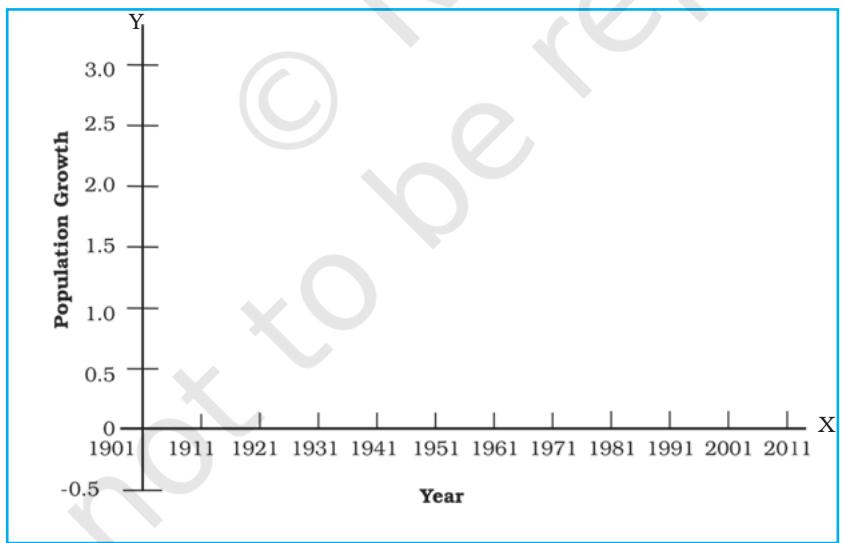
(d) Plot the data to depict year/month-wise values according to the selected scale on Y-axis, mark the location of the plotted values by a dot and join these dots by a free hand drawn line.
| Year | Growth rate in percentage |
| 1901 | - |
| 1911 | 0.56 |
| 1921 | -0.30 |
| 1931 | 1.04 |
| 1941 | 1.33 |
| 1951 | 1.25 |
| 1961 | 1.96 |
| 1971 | 2.20 |
| 1981 | 2.22 |
| 1991 | 2.14 |
| 2001 | 1.93 |
| 2011 | 1.79 |
Activity
Find out the reasons for sudden change in population between 1911 and 1921 as shown in Fig. 3.2.
Polygraph
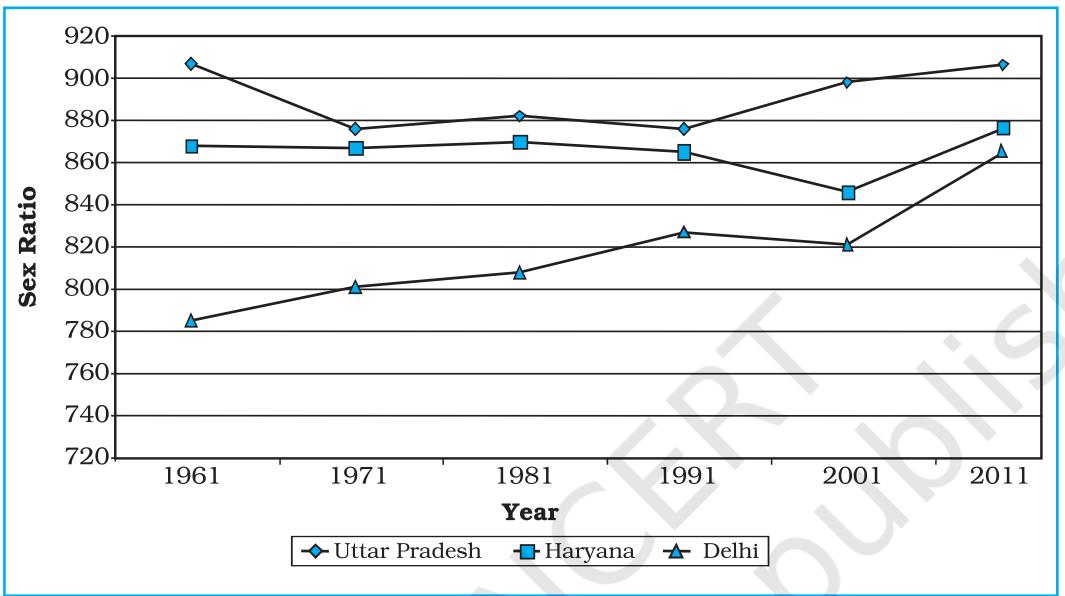
Polygraph is a line graph in which two or more than two variables are shown by an equal number of lines for an immediate comparison, such as the growth rate of different crops like rice, wheat, pulses or the birth rates, death rates and life expectancy or sex ratio in different states or countries. A different line pattern such as straight line (____), broken line (- - - ), dotted line (......) or a combination of dotted and broken line (-.-.-) or line of different colours may be used to indicate the value of different variables (Fig 3.3).
Example 3.2 : Construct a polygraph to compare the growth of sex-ratio in different states as given in the Table 3.2 :
| States/UT | 1961 | 1971 | 1981 | 1991 | 2001 | 2011 |
| Delhi | 785 | 801 | 808 | 827 | 821 | 866 |
| Haryana | 868 | 867 | 870 | 860 | 846 | 877 |
| Uttar Pradesh | 907 | 876 | 882 | 876 | 898 | 908 |
Bar Diagram
The bar diagrams are drawn through columns of equal width. It is also called a columnar diagram. Following rules should be observed while constructing a bar diagram:
The simple, compound or polybar diagram may be constructed to suit the data characteristics.
Simple Bar Diagram
A simple bar diagram is constructed for an immediate comparison. It is advisable to arrange the given data set in an ascending or descending order and plot the data variables accordingly. However, time series data are represented according to the sequencing of the time period.
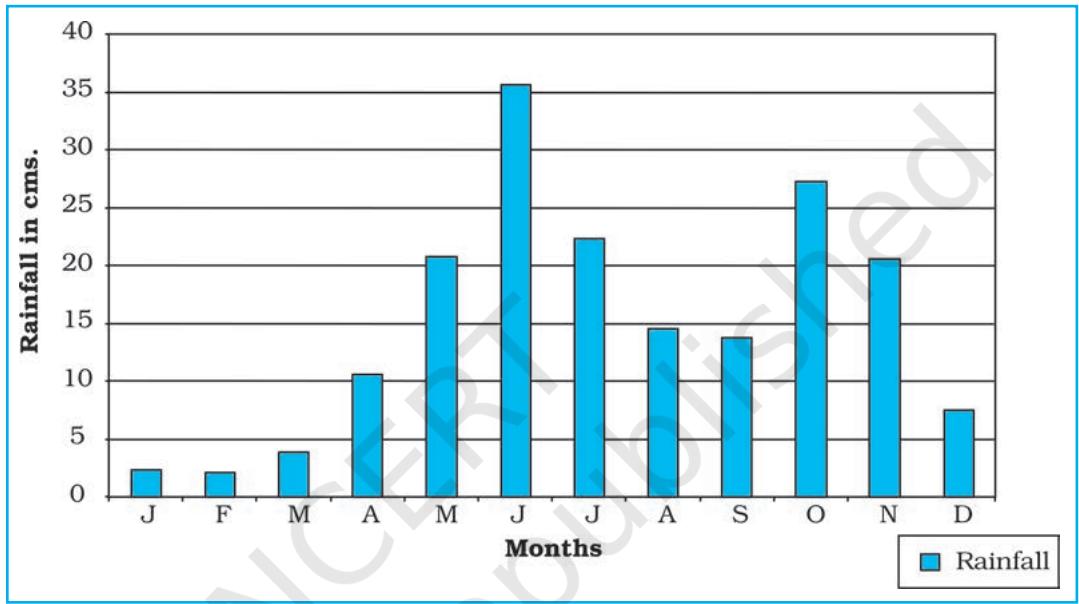
Example 3.3 : Construct a simple bar diagram to represent the rainfall data of Thiruvananthapuram as given in Table 3.3 :
| Months | J | F | M | A | M | J | J | A | S | O | N | D |
| Rainfall in cm | 2.3 | 2.1 | 3.7 | 10.6 | 20.8 | 35.6 | 22.3 | 14.6 | 13.8 | 27.3 | 20.6 | 7.5 |
Construction
Draw X and Y-axes on a graph paper. Take an interval of 5 cm and mark it on Y-axis to plot rainfall data in cm. Divide X-axis into 12 equal parts to represent 12 months. The actual rainfall values for each month will be plotted according to the selected scale as shown in Fig. 3.4.
Line and Bar Graph
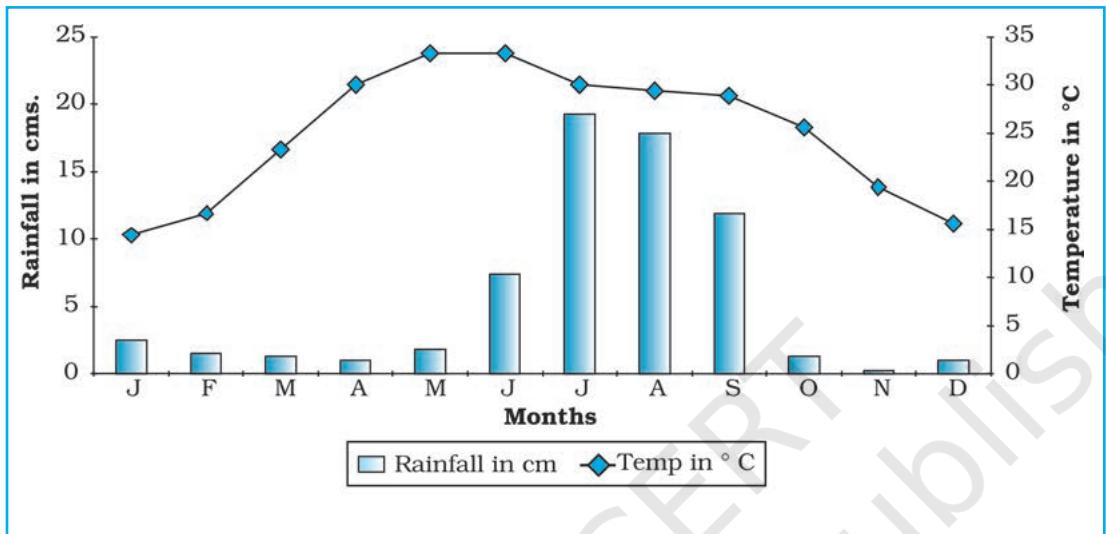
The line and bar graphs as drawn separately may also be combined to depict the data related to some of the closely associated characteristics such as the climatic
data of mean monthly temperatures and rainfall. In doing so, a single diagram is drawn in which months are represented on X-axis while temperature and rainfall data are shown on Y-axis at both sides of the diagram.
Example 3.4 : Construct a line graph and bar diagram to represent the average monthly rainfall and temperature data of Delhi as given in Table 3.4 :
| Months | Temp. in °C | Rainfall in cm. |
| Jan. | 14.4 | 2.5 |
| Feb. | 16.7 | 1.5 |
| Mar. | 23.30 | 1.3 |
| Apr. | 30.0 | 1.0 |
| May | 33.3 | 1.8 |
| June | 33.3 | 7.4 |
| Jul. | 30.0 | 19.3 |
| Aug. | 29.4 | 17.8 |
| Sep. | 28.9 | 11.9 |
| Oct. | 25.6 | 1.3 |
| Nov. | 19.4 | 0.2 |
| Dec. | 15.6 | 1.0 |
Construction
Multiple Bar Diagram
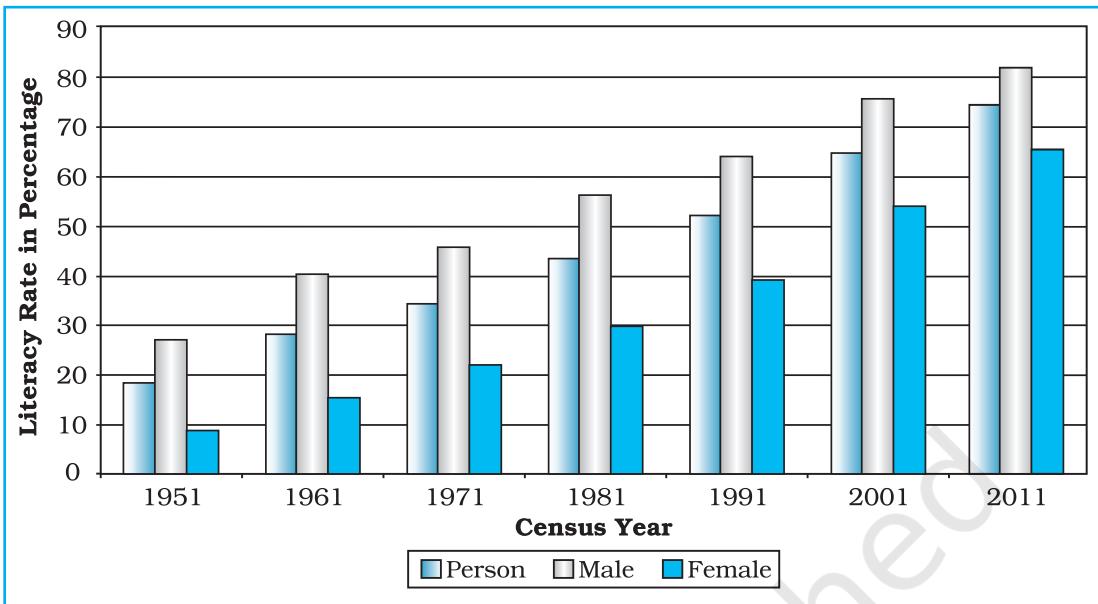
Multiple bar diagrams are constructed to represent two or more than two variables for the purpose of comparison. For example, a multiple bar diagram may be constructed to show proportion of males and females in the total, rural and urban population or the share of canal, tube well and well irrigation in the total irrigated area in different states.
Example 3.5 : Construct a suitable bar diagram to show decadal literacy rate in India during 1951–2011 as given in Table 3.5 :
Construction
| Year | Literacy Rate | ||
| Total population | Male | Female | |
| 1951 | 18.33 | 27.16 | 8.86 |
| 1961 | 28.3 | 40.4 | 15.35 |
| 1971 | 34.45 | 45.96 | 21.97 |
| 1981 | 43.57 | 56.38 | 29.76 |
| 1991 | 52.21 | 64.13 | 39.29 |
| 2001 | 64.84 | 75.85 | 54.16 |
| 2011 | 73.0 | 80.9 | 64.6 |
(c) Plot the per cent of total population, male and female in closed columns (Fig 3.6).
Compound Bar Diagram
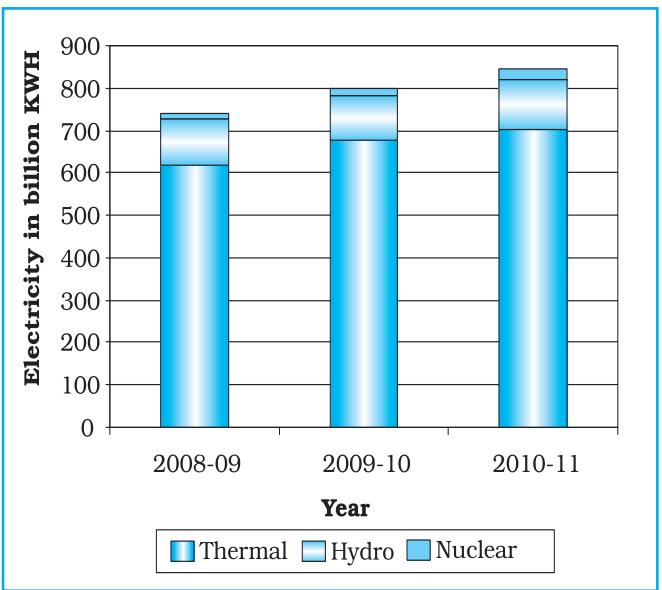
When different components are grouped in one set of variable or different variables of one component are put together, their representation is made by a compound bar diagram. In this method, different variables are shown in a single bar with different rectangles.
Example 3.6 : Construct a compound bar diagram to depict the data as shown in Table 3.6 :
| Year | Thermal | Hydro | Nuclear | Total |
| 2008-09 | 616.2 | 110.1 | 14.9 | 741.2 |
| 2009-10 | 677.1 | 104.1 | 18.6 | 799.8 |
| 2010-11 | 704.3 | 114.2 | 26.3 | 844.8 |
Construction
Pie Diagram
Pie diagram is another graphical method of the representation of data. It is drawn to depict the total value of the given attribute using a circle. Dividing the circle into corresponding degrees of angle then represent the sub-sets of the data. Hence, it is also called Divided Circle Diagram.
The angle of each variable is calculated using the following formulae.
Value of given State/Region × 360
Total Value of All States/Regions
If data are given in percentage form, the angles are calculated using the given formulae.
For example, a pie diagram may be drawn to show the total population of India along with the proportion of the rural and urban population. In this case, the circle of an appropriate radius is drawn to represent the total population and its sub-divisions into rural and urban population are shown by corresponding degrees of angle.
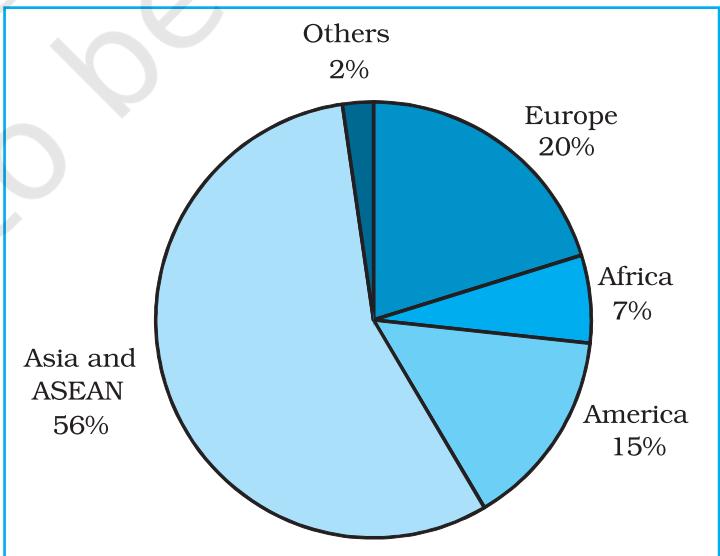
Example 3.7: Represent the data as given in Table 3.7 (a) with a suitable diagram.
Calculation of Angles
Table 3.7(b). It could be done by multiplying percentage with a constant of 3.6 as derived by dividing the total number of degrees in a circle by 100, i. e. 360/100.
| Unit/Region | % of Indian Export |
| Europe | 20.2 |
| Africa | 6.5 |
| America | 14.8 |
| Asia and ASEAN | 56.2 |
| Others | 2.3 |
| Total | 100 |
(c) Plot the data by dividing the circle into the required number of divisions to show the share of India's export to different regions/countries (Fig. 3.8).
| Countries | % | Calculation | Degree |
| Europe | 20.2 | 20.2 × 3.6 = 72.72 | 73° |
| Africa | 6.5 | 6.5 × 3.6 = 23.4 | 23° |
| America | 14.8 | 14.8 × 3.6 = 53.28 | 53° |
| Asia and ASEAN | 56.2 | 56.2 × 3.6 = 202.32 | 203° |
| Others | 2.3 | 2.3 × 3.6 = 8.28 | 8° |
| Total | 100 | 360° |
Construction
Precautions
Flow Maps/Chart
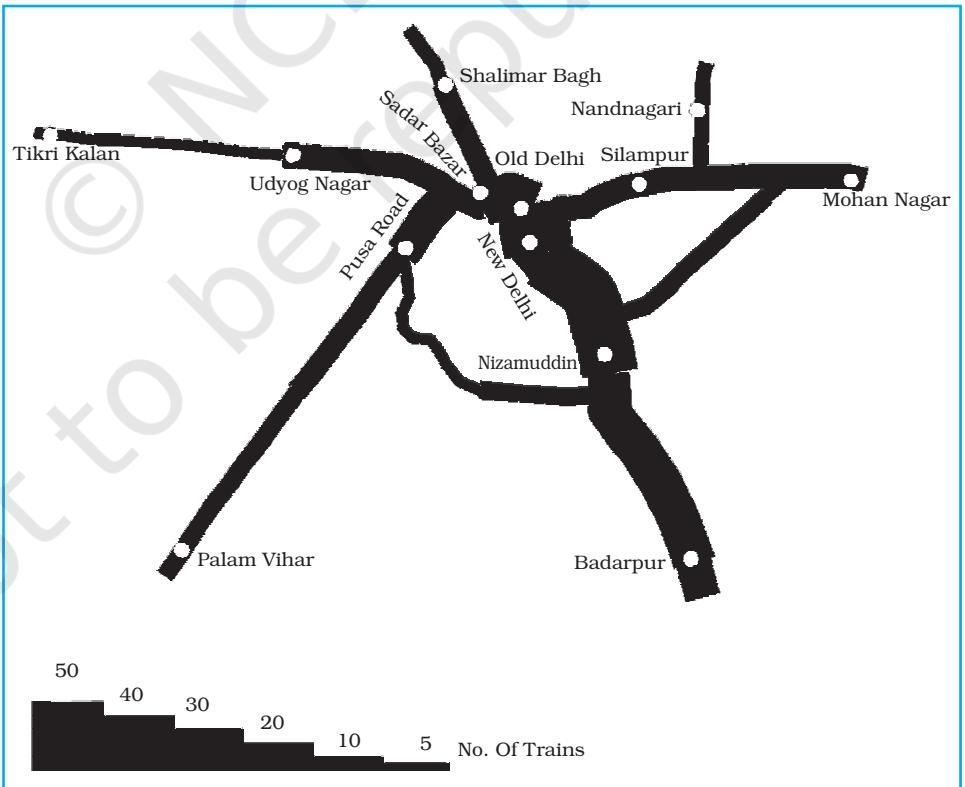
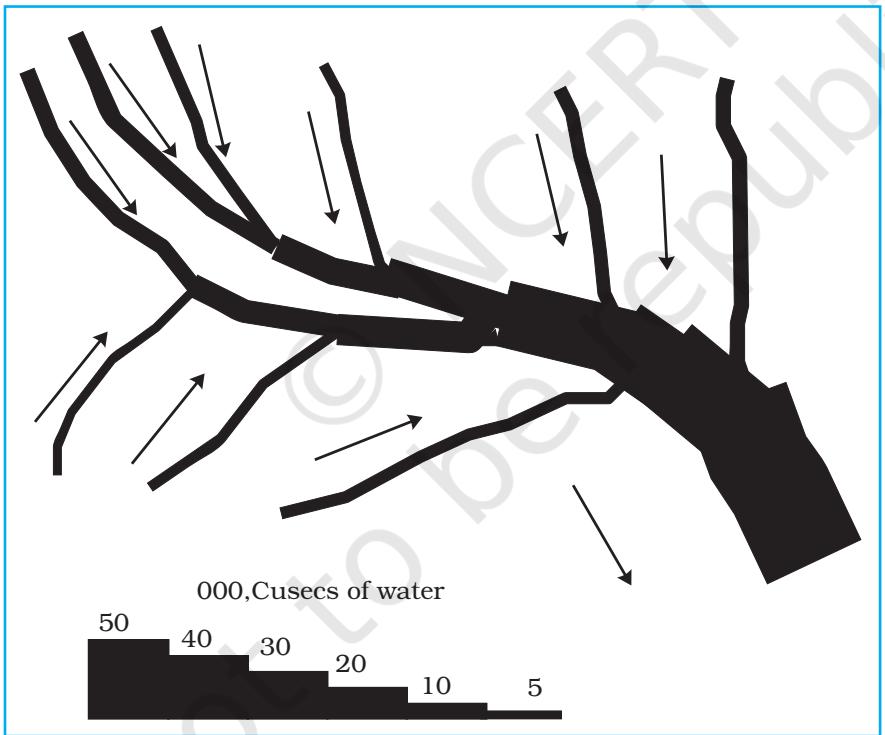
Flow chart is a combination of graph and map. It is drawn to show the flow of commodities or people between the places of origin and destination. It is also called Dynamic Map. Transport map, which shows the number of passengers, vehicles, etc., is the best example of a flow chart. These charts are drawn using lines of proportional width. Many government agencies prepare flow maps to show density of the means of transportation on different routes. The flow maps/charts are generally drawn to represent two the types of data as given below:
Requirements for the Preparation of a Flow Map
(a) A route map depicting the desired transport routes along with the connecting stations.
(b) The data pertaining to the flow of goods, services, number of vehicles, etc., along with the point of origin and destination of the movements.
(c) The selection of a scale through which the data related to the quantity of passengers and goods or the number of vehicles is to be represented.
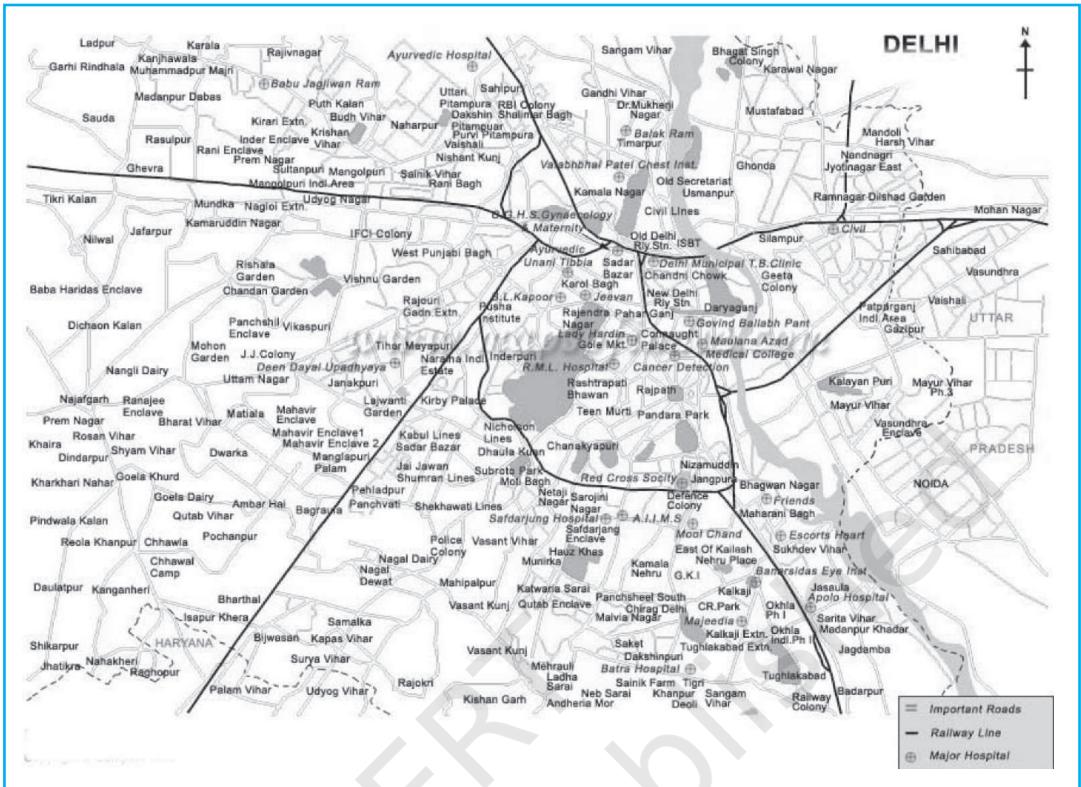
Example 3.8 : Construct a flow map to represent the number of trains running in Delhi and the adjoining areas as given in the Table 3.8.
| S.No. | Railway Routes | No. of Trains |
| 1. | Old Delhi - New Delhi | 50 |
| 2. | New Delhi-Nizamuddin | 40 |
| 3. | Nizamuddin-Badarpur | 30 |
| 4. | Nizamuddin-Sarojini Nagar | 12 |
| 5. | Sarojini Nagar - Pusa Road | 8 |
| 6. | Old Delhi - Sadar Bazar | 32 |
| 7. | Udyog Nagar-Tikri Kalan | 6 |
| 8. | Pusa Road - Pehladpur | 15 |
| 9. | Sahibabad-Mohan Nagar | 18 |
| 10. | Old Delhi - Silampur | 33 |
| 11. | Silampur - Nand Nagari | 12 |
| 12. | Silampur-Mohan Nagar | 21 |
| 13. | Old Delhi-Shalimar Bagh | 16 |
| 14. | Sadar Bazar-Udyog Nagar | 18 |
| 15. | Old Delhi - Pusa Road | 22 |
| 16. | Pehladpur - Palam Vihar | 12 |
Construction
(d) Draw a terraced scale as legend and choose distinct sign or symbol to show the nodal points (stations) within the strip.
Example 3.9 : Construct a water flow map of Ganga Basin as shown in Fig. 3.11.
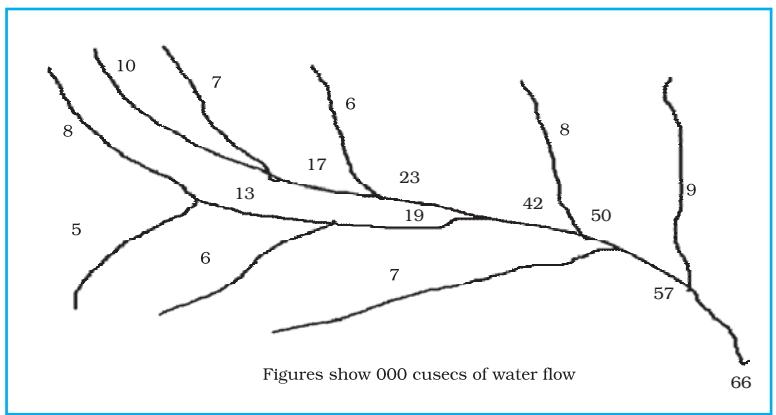
Construction
Thematic Maps
Graphs and diagrams serve a useful purpose in providing a comparison between the internal variations within the data of different characteristics represented. However, the use of graphs and diagrams, at times, fails to produce a regional perspective. Hence, variety of maps may also be drawn to understand the patterns of the regional distributions or the characteristics of variations over space. These maps are also known as the distribution maps.
Requirements for Making a Thematic Map
Rules for Making Thematic Maps
(i) The drawing of the thematic maps must be carefully planned. The final map should properly reflect the following components:
(ii) The selection of a suitable method to be used for thematic mapping.
Classification of Thematic Maps based on Method of Construction
The thematic maps are, generally, classified into quantitative and non-quantitative maps. The quantitative maps are drawn to show the variations within the data. For example, maps depicting areas receiving more than 200 cm, 100 to 200 cm, 50 to 100 cm and less than 50 cm of rainfall are referred as quantitative maps. These maps are also called statistical maps. The non-quantitative maps, on the other hand, depict the non-measurable characteristics in the distribution of given information, such as a map showing high and low rainfall-receiving areas. These maps are also called qualitative maps. It would not be possible to discuss drawing these different types of thematic maps under the constraint of time. We will, therefore, confine to discuss the methods of the construction of the following types of quantitative maps :
Dot Maps
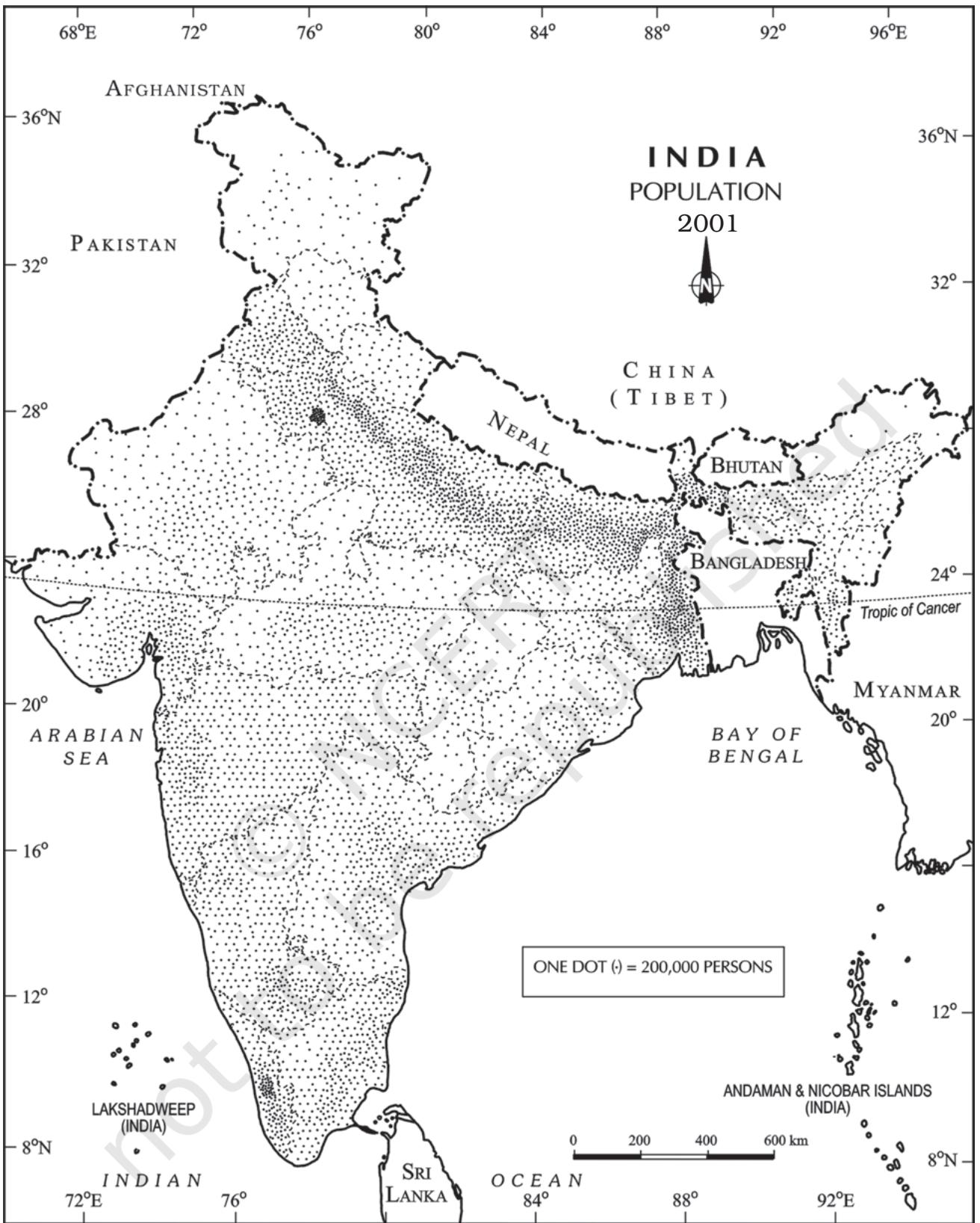
The dot maps are drawn to show the distribution of phenomena such as population, cattle, types of crops, etc. The dots of same size as per the chosen scale are marked over the given administrative units to highlight the patterns of distributions.
Requirement
(a) An administrative map of the given area showing state/district/block boundaries.
Precaution
Example 3.10 : Construct a dot map to represent population data of 2001 as given in Table 3.9.
| Sl. No. | States/Union Territories | Total Population | No. of dots |
| 1. | Jammu & Kashmir | 10,069,917 | 100 |
| 2. | Himachal Pradesh | 6,077,248 | 60 |
| 3. | Punjab | 24,289,296 | 243 |
| 4. | Uttarakhand | 8,479,562 | 85 |
| 5. | Haryana | 21,082,989 | 211 |
| 6. | Delhi | 13,782,976 | 138 |
| 7. | Rajasthan | 56,473,122 | 565 |
| 8. | Uttar Pradesh | 166,052,859 | 1,660 |
| 9. | Bihar | 82,878,796 | 829 |
| 10. | Sikkim | 540,493 | 5 |
| 11. | Arunachal Pradesh | 1,091,117 | 11 |
| 12. | Nagaland | 1,988,636 | 20 |
| 13. | Manipur | 2,388,634 | 24 |
| 14. | Mizoram | 891,058 | 89 |
| 15. | Tripura | 3,191,168 | 32 |
| 16. | Meghalaya | 2,306,069 | 23 |
| 17. | Assam | 26,638,407 | 266 |
| 18. | West Bengal | 80,221,171 | 802 |
| 19. | Jharkhand | 26,909,428 | 269 |
| 20. | Odisha | 36,706,920 | 367 |
| 21. | Chhattisgarh | 20,795,956 | 208 |
| 22. | Madhya Pradesh | 60,385,118 | 604 |
| 23. | Gujarat | 50,596,992 | 506 |
| 24. | Maharashtra | 96,752,247 | 968 |
| 25. | Andhra Pradesh | 75,727,541 | 757 |
| 26. | Karnataka | 52,733,958 | 527 |
| 27. | Goa | 1,343,998 | 13 |
| 28. | Kerala | 31,838,619 | 318 |
| 29. | Tamil Nadu | 62,110,839 | 621 |
Construction
Choropleth Map
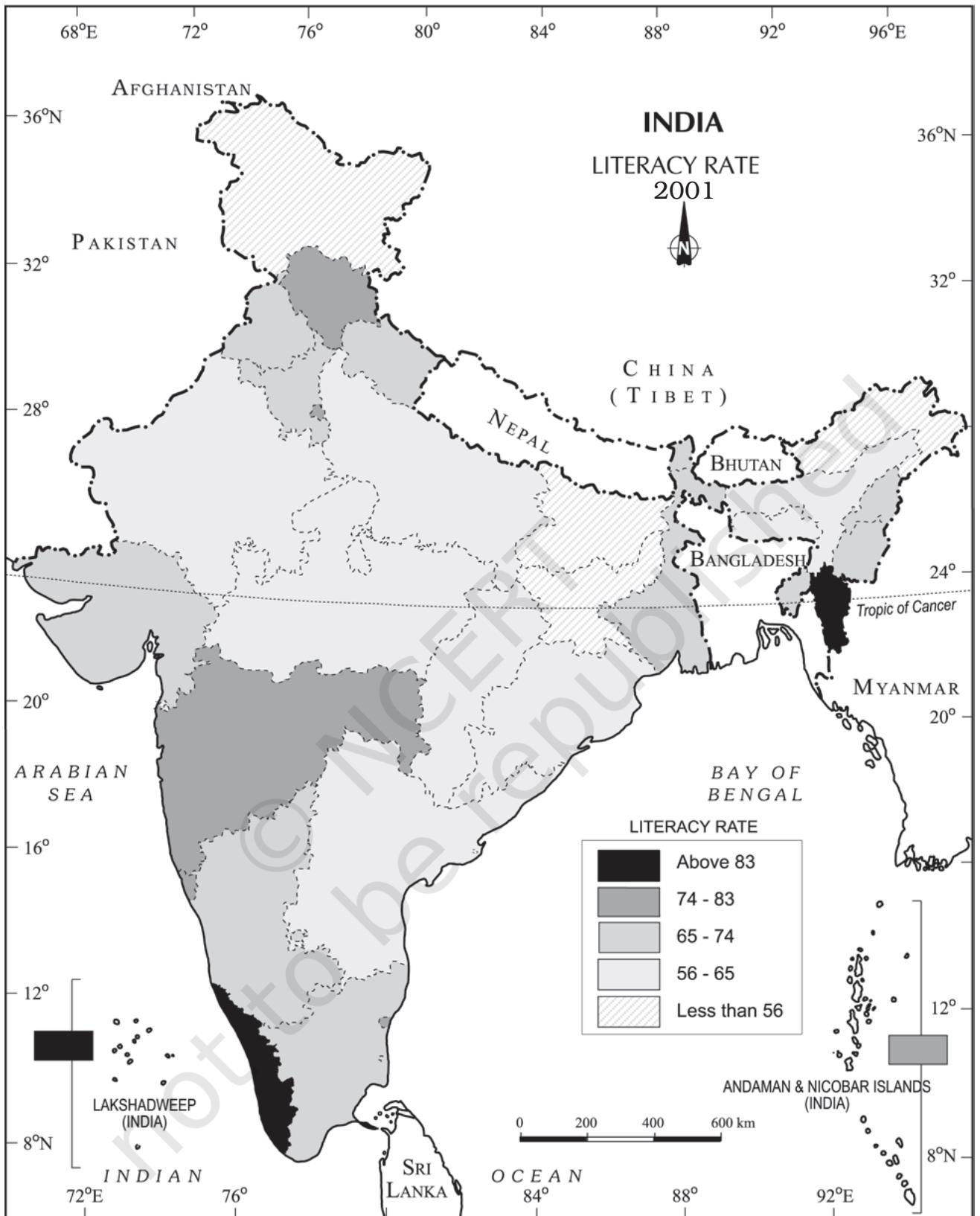
The choropleth maps are also drawn to depict the data characteristics as they are related to the administrative units. These maps are used to represent the density of population, literacy/growth rates, sex ratio, etc.
Requirement for drawing Choropleth Map
Steps to be followed
Example 3.11: Construct a Choropleth map to represent the literacy rates in India in 2001 as given in Table 3.10.
Construction
| Original Data on Literacy in India | ||
| S. No. | States / Union Territories | Literacy Rate |
| 1. | Jammu & Kashmir | 55.5 |
| 2. | Himachal Pradesh | 76.5 |
| 3. | Punjab | 69.7 |
| 4. | Chandigarh | 81.9 |
| 5. | Uttarakhand | 71.6 |
| 6. | Haryana | 67.9 |
| 7. | Delhi | 81.7 |
| 8. | Rajasthan | 60.4 |
| 9. | Uttar Pradesh | 56.3 |
| 10. | Bihar | 47.0 |
| 11. | Sikkim | 68.8 |
| 12. | Arunachal Pradesh | 54.3 |
| 13. | Nagaland | 66.6 |
| 14. | Manipur | 70.5 |
| 15. | Mizoram | 88.8 |
| 16. | Tripura | 73.2 |
| 17. | Meghalaya | 62.6 |
| 18. | Assam | 63.3 |
| 19. | West Bengal | 68.6 |
| 20. | Jharkhand | 53.6 |
| 21. | Odisha | 63.1 |
| 22. | Chhattisgarh | 64.7 |
| 23. | Madhya Pradesh | 63.7 |
| 24. | Gujarat | 69.1 |
| 25. | Daman & Diu | 78.2 |
| 26. | Dadra & Nagar Haveli | 57.6 |
| 27. | Maharashtra | 76.9 |
| 28. | Andhra Pradesh | 60.5 |
| 29. | Karnataka | 66.6 |
| 30. | Goa | 82.0 |
| 31. | Lakshadweep | 86.7 |
| 32. | Kerala | 90.9 |
| 33. | Tamil Nadu | 73.5 |
| 34. | Puducherry | 81.2 |
| 35. | Andaman & Nicobar Islands | 81.3 |
| Data on Literacy in India as arranged in Ascending order | ||
| S. No. | States / Union Territories | Literacy Rate |
| 10. | Bihar | 47.0 |
| 20. | Jharkhand | 53.6 |
| 12. | Arunachal Pradesh | 54.3 |
| 01. | Jammu & Kashmir | 55.5 |
| 9. | Uttar Pradesh | 56.3 |
| 26. | Dadra & Nagar Haveli | 57.6 |
| 08. | Rajasthan | 60.4 |
| 28. | Andhra Pradesh | 60.5 |
| 17. | Meghalaya | 62.6 |
| 21. | Odisha | 63.1 |
| 18. | Assam | 63.3 |
| 23. | Madhya Pradesh | 63.7 |
| 22. | Chhattisgarh | 64.7 |
| 13. | Nagaland | 66.6 |
| 29. | Karnataka | 66.6 |
| 06. | Haryana | 67.9 |
| 19. | West Bengal | 68.6 |
| 11. | Sikkim | 68.8 |
| 24. | Gujarat | 69.1 |
| 03. | Punjab | 69.7 |
| 14. | Manipur | 70.5 |
| 05. | Uttarakhand | 71.6 |
| 16. | Tripura | 73.2 |
| 33. | Tamil Nadu | 73.5 |
| 02. | Himachal Pradesh | 76.5 |
| 27. | Maharashtra | 76.9 |
| 25. | Daman & Diu | 78.2 |
| 34. | Puducherry | 81.2 |
| 35. | Andaman & Nicobar Islands | 81.3 |
| 07. | Delhi | 81.7 |
| 04. | Chandigarh | 81.9 |
| 30. | Goa | 82.0 |
| 31. | Lakshadweep | 86.7 |
| 15. | Mizoram | 88.8 |
| 32. | Kerala | 90.9 |
65 - 74
Medium (Nagaland, Karnataka, Haryana, West Bengal, Sikkim, Gujarat, Punjab, Manipur, Uttarakhand, Tripura, Tamil Nadu)
74 - 83
High (Himachal Pradesh, Maharashtra, Delhi, Goa)
83 - 92
Very high (Mizoram, Kerala)
Isopleth Map
We have seen that the data related to the administrative units are represented using choropleth maps. However, the variations within the data, in many cases, may also be observed on the basis of natural boundaries. For example, variations in the degrees of slope, temperature, occurrence of rainfall, etc. possess characteristics of the continuity in the data. These geographical facts may be represented by drawing the lines of equal values on a map. All such maps are termed as Isopleth Map. The word Isopleth is derived from Iso meaning equal and pleth means lines. Thus, an imaginary line, which joins the places of equal values, is referred as Isopleth. The more frequently drawn isopleths include Isotherm (equal temperature), Isobar (equal pressure), Isohyets (equal rainfall), Isonephs (equal cloudiness), Isohels (equal sunshine), contours (equal heights), Isobaths (equal depths), Isohaline (equal salinity), etc.
Requirement
Rules to be observed
Interpolation
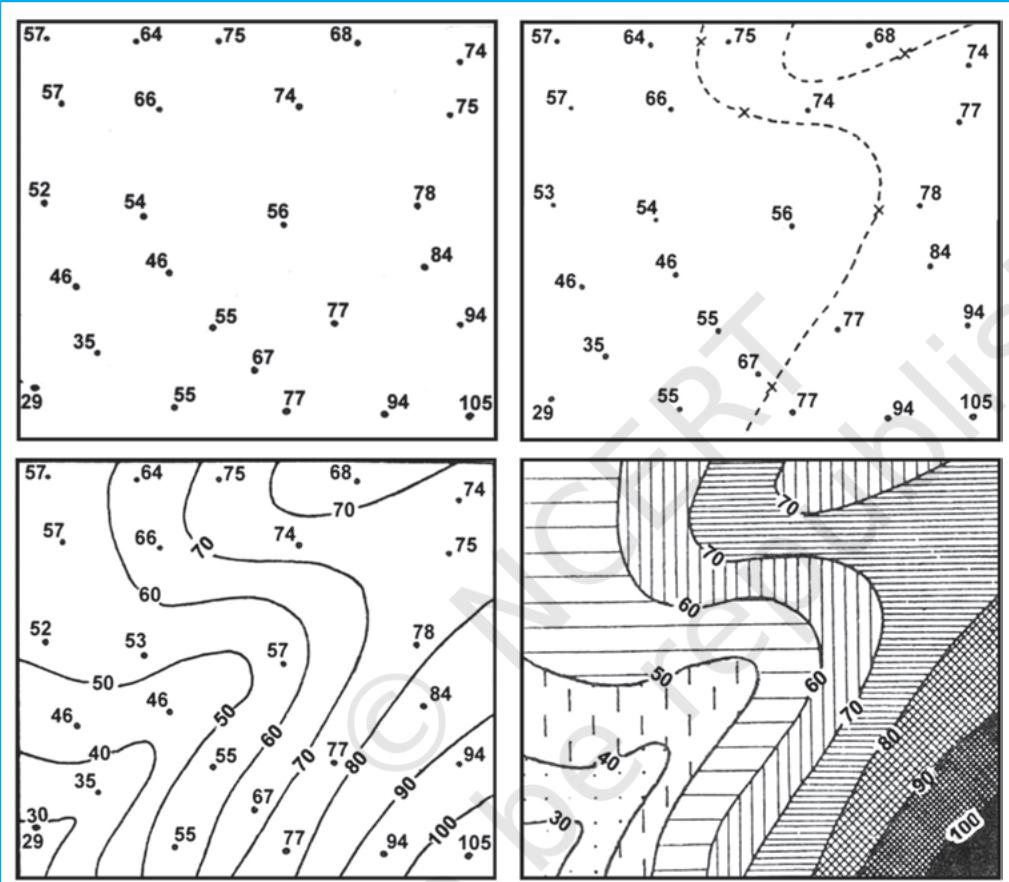
Interpolation is used to insert the intermediate values between the observed values of at two stations/locations, such as temperature recorded at Chennai and Hyderabad or the spot heights of two points. Generally, drawing of isopleths joining the places of same value is also termed as interpolation.
Method of Interpolation
For interpolation, follow the following steps:
The exact point of drawing an Isopleth is determined by using the following formulae.
The interval is the difference between the actual value on the map and interpolated value. For example, in an Isotherm map of two places show and and you want to draw isotherm, measure the distance between the two points. Suppose, the distance is 1cm or 10 mm and the difference between 28 and 33 is 5, whereas, 30 is 2 points away from 28 and 3 points behind 33, thus, exact point of 30 will be
Thus, isotherm of will be plotted 4mm away from or 6mm ahead of .
(d) Draw the isopleths of minimum value first; other isopleths may be drawn accordingly.
Exercises
1. Choose the right answer from the four alternatives given below:
(i) Which one of the following map shows the population distribution:
(a) Choropleth maps
(b) Isopleth maps
(c) Dot maps
(d) Square root maps
(ii) Which one of the following is best suited to represent the decadal growth of population?
(a) Line graph
(b) Bar diagram
(c) Circle diagram
(d) Flow diagram
(iii) Polygraph is constructed to represent:
(iv) Which one of the following maps is known as “Dynamic Map”?
(a) Dot map (b) Choropleth
(c) Isopleth (d) Flow map
2. Answer the following questions in about 30 words:
Activity
1. Represent the following data with the help of suitable diagram.
| Year | Decennial growth (%) |
| 1911 | 0.35 |
| 1921 | 8.27 |
| 1931 | 19.12 |
| 1941 | 31.97 |
| 1951 | 41.42 |
| 1961 | 26.41 |
| 1971 | 38.23 |
| 1981 | 46.14 |
| 1991 | 36.47 |
| 2001 | 31.13 |
2. Represent the following data with the help of suitable diagram.
| Year | Literacy Ratio | Enrolment Ratio Primary | Enrolment Ratio Upper Primary | ||||||
| Person | Male | Female | Boys | Girls | Total | Boys | Girls | Total | |
| 1950-51 | 18.3 | 27.2 | 8.86 | 60.6 | 25 | 42.6 | 20.6 | 4.6 | 12.7 |
| 1999-2000 | 65.4 | 75.8 | 54.2 | 104 | 85 | 94.9 | 67.2 | 50 | 58.8 |
3. Represent the following data with help of pie-diagram.
| 1950-51 | 1998-2001 | |
| Net Sown Area | 42 | 46 |
| Forest | 14 | 22 |
| Not available for cultivation | 17 | 14 |
| Fallow Land | 10 | 8 |
| Pasture and Tree | 9 | 5 |
| Cultruable Waste Land | 8 | 5 |
4. Study the table given below and draw the given diagrams/maps.
| States | Area in 000 ha | % to total area | Production 000 tones | % to total production |
| West Bengal | 5,435 | 12.3 | 12,428 | 14.6 |
| Uttar Pradesh | 5,839 | 13.2 | 11,540 | 13.6 |
| Andhra Pradesh | 4,028 | 9.1 | 12,428 | 13.5 |
| Punjab | 2,611 | 5.9 | 9,154 | 10.8 |
| Tamil Nadu | 2,113 | 4.8 | 7,218 | 8.5 |
| Bihar | 3,671 | 8.3 | 5,417 | 6.4 |
5. Show the following data of temperature and rainfall of Kolkata with a suitable diagram.
| Months | Temperature in C | Rainfall in cm |
| Jan. | 19.6 | 1.2 |
| Feb. | 22.0 | 2.8 |
| Mar. | 27.1 | 3.4 |
| Apr. | 30.1 | 5.1 |
| May | 30.4 | 13.4 |
| June | 29.9 | 29.0 |
| Jul. | 28.9 | 33.1 |
| Aug. | 28.7 | 33.4 |
| Sep. | 28.9 | 25.3 |
| Oct. | 27.6 | 12.7 |
| Nov. | 23.4 | 2.7 |
| Dec. | 19.7 | 0.4 |